


MyRecipes
3.271.00 Reviews
App Specs
- Version
- 1.2.0
- Updated On
- License
- Free
- Downloads
- 50,000+
- Developer
- PEOPLE INC. GROUP
- Categories
- Food & Drink
- Platform
- Android
Screenshots




 Analysis by AppCompare
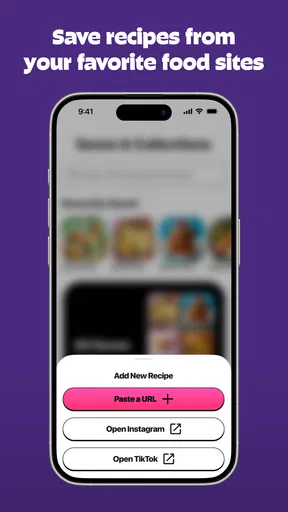
MyRecipes caught my attention for a practical reason: it aims to make the recipes I encounter while scrolling social media useful again once I’m in the kitchen. That turns a recipe app into something more than a searchable collection. Instead of trying to remember a dish from a TikTok clip or find an Instagram post days later, I can treat those discoveries as candidates for a meal plan. In my view, that is the idea worth considering here—and also the part that needs the most realistic expectations.
A small habit that makes saved recipes more useful
I would make the most of social saves by adding a quick note to my own routine outside the app: when I save a dish, I would remember what caught my eye, such as a sauce, ingredient pairing, or cooking method. That gives me a useful reason to revisit it later, rather than opening a stack of saved posts and wondering why each one appealed. It is a modest habit, but it helps turn casual discovery into a more intentional shortlist.
It also helps to separate “I want to cook this” from “I want to borrow this idea.” A clip may inspire a flavor combination without offering a complete method. If I label that distinction mentally, I can use a saved post as a starting point without expecting it to function like a tested, step-by-step recipe. That difference is especially useful when I’m cooking for someone else or planning around ingredients I already have.
From a passing post to a recipe worth keeping
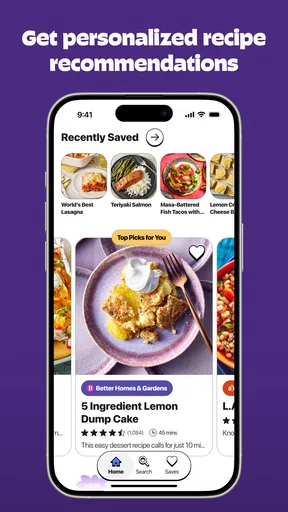
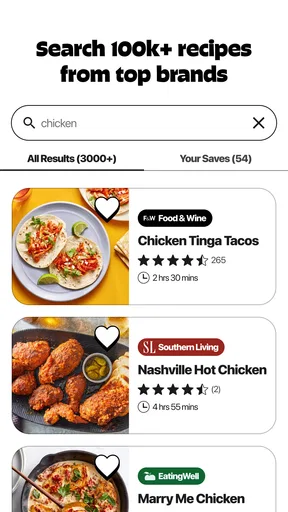
The central appeal of MyRecipes is the mix of a broad recipe library and the ability to save recipes from TikTok and Instagram. The app is free to download, and its collection is described as containing more than 100,000 trusted recipes. Those two sources serve different moods: the library is useful when I know what I want to cook, while social saves suit the moment when a dish simply looks appealing as I browse.
That distinction matters in everyday use. A social video can be inspiring but inconvenient: ingredients flash past, measurements may be hard to catch, and the creator’s post can disappear into a crowded feed. Saving a recipe gives that idea a better chance of becoming dinner rather than another half-remembered clip. I would see the feature less as a novelty and more as a bridge between browsing for fun and making a deliberate cooking choice.
Still, saving something does not automatically make it a dependable recipe. Social posts vary in how clearly they explain quantities, timing, and technique. I would check a saved idea before shopping or cooking, especially if the video relies on visual cues rather than precise instructions. The real value is having a place to return to the inspiration; the cook still needs to decide whether it contains enough detail to follow.
A useful distinction between discovery and cooking
Recipe apps often lean heavily toward one of two habits: searching a curated collection or collecting links from around the web. MyRecipes brings those habits together. That can be a better fit for someone whose food ideas start in social feeds, but it does not mean every saved post will be as complete or easy to follow as a carefully written recipe from a dedicated cooking site.
Worth Reading Before You Choose

EA SPORTS FC Mobile 26 Is a Bigger Football Game, but It Takes Time

Flipboard Shows What News Apps Must Do Beyond the Feed

Switching to Android Auto Means Rethinking Your Driving Routine

Google Calendar Makes a Crowded Week Easier to Manage

Ludo King Makes the Most of the Minutes Between Plans

Baby Panda World Brings Quick Play to Modern Phones, but Its Game Library Feels Busy
I would use the built-in collection when I want a more direct starting point, such as looking for a dinner idea, and use social saves to keep track of dishes I might adapt later. Keeping those purposes separate in my head makes the app easier to evaluate: its strength is reducing the distance between discovery and later reference, not guaranteeing that every piece of inspiration is kitchen-ready.
How I would put it to work during a busy week
Imagine I spot a quick-looking pasta dish while scrolling during a commute. I save it instead of relying on memory, then return to it when deciding what to make after work. Before heading to the shop, I check whether the post actually shows the ingredients and amounts I need. If it does, I can use it as the basis for dinner. If it skips important details, I can treat it as inspiration and choose a more complete recipe from the app’s collection instead.
That small check is a useful habit because social cooking content often makes the finished dish look clearer than the method. I would pay attention to whether the creator names the heat level, gives a meaningful cooking time, and shows how ingredients change as they cook. If those details are missing, saving the post is still worthwhile, but I would not plan a time-sensitive meal around it without a backup.
There is also a practical way to keep saved ideas from becoming a second endless feed. I would save only dishes I can imagine cooking, rather than every attractive plate, and revisit that set when planning meals. This is not a special tool I am claiming the app provides; it is a simple workflow that makes the social-saving idea more useful. Without some personal selectiveness, saved recipes can pile up just as quickly as bookmarks elsewhere.
For a household with different tastes, a saved post can also help explain what I mean by a meal idea. Sharing the actual dish with someone is often easier than describing a video from memory. But I would still discuss substitutions and portions separately; a visual post may not answer questions about dietary needs or how much food it makes.
Where the convenience has limits
The social-first approach depends on the quality of the material being saved. A polished clip may be enjoyable to watch yet leave out exact amounts, preparation steps, or the point at which an ingredient should be added. That creates a trade-off: the format is excellent for spotting ideas, but less reliable when I need precise instructions. For baking, unfamiliar techniques, or a meal that has to be ready at a particular time, I would favor a recipe with clear measurements and a complete method.
There is a second trade-off in the size of the recipe collection. More than 100,000 options sounds useful, but abundance can make choosing harder if I arrive without a plan. I would narrow a search around a specific ingredient, dish, or occasion rather than browsing without direction. A smaller, focused recipe source can be more comfortable for someone who wants a tightly edited set of dependable favorites instead of a large pool of possibilities.
The app has a 3.2 average from around 110 ratings, so I would not approach it as an unquestioned favorite. That score is a reason to try it for the particular workflow that interests me, then judge whether saving and revisiting recipes fits my habits. It is not, by itself, proof that the app will or will not suit a given cook. My practical test would be whether I can turn a few saved ideas into meals without spending more time organizing than cooking.
MyRecipes is free to start, with optional in-app purchases ranging from $6.99 to $39.99 per item. I would begin with the free experience and decide whether any paid option addresses a need I actually have, rather than paying simply because I expect every feature to be essential. The age rating is Everyone, which makes the app broadly approachable, though that does not change the need to use ordinary care when following cooking instructions or handling ingredients.
What to check before you commit to a recipe
When a social post looks promising, I would check more than the ingredient list. Look for whether the instructions make clear what needs to be prepared first, when the main ingredients go into the pan, and how the cook knows a step is finished. A recipe that says “cook until ready” without giving a visual or timing cue can be difficult to use when you are new to the dish. This quick scan helps me decide whether I can follow the post as written, need to adapt it, or should choose something else.
I would also think about the gap between the dish shown and the meal I actually need. A short video may show a finished plate without making its serving size obvious, so I would avoid assuming it feeds a whole household. If I’m cooking for guests, I would favor a recipe with quantities I can scale confidently. For a casual meal for myself, I’m more comfortable treating an unclear post as a loose guide.
Who is most likely to appreciate it
I think the best match is someone who already finds food ideas on TikTok or Instagram and repeatedly loses track of them. If that sounds familiar, keeping discoveries connected to a recipe app could save the small but irritating effort of retracing a feed. It may also suit a casual cook who wants one place to look for inspiration and is comfortable checking whether each recipe has enough detail before committing to it.
It is less compelling for someone who avoids social media, prefers a short and carefully curated cookbook, or needs every recipe to provide exact measurements and fully explained steps. A dedicated recipe site or a trusted cookbook may be a better choice when precision matters more than discovery. Likewise, if I already have a reliable system for saving and organizing recipes, the main reason to switch would be whether MyRecipes makes social finds easier to use—not simply that it offers another large collection.
For someone who cooks from a familiar rotation, the app may be most useful as a source of occasional new ideas rather than as a replacement for that routine. I would keep tried-and-true weeknight meals in whatever format already works, then use social saves when I want to experiment. That avoids the pressure to move an entire recipe collection just to benefit from one specific feature. If the social-saving step feels like extra work after a few attempts, that is a sensible sign to stick with a simpler recipe source.
The app is made by PEOPLE INC. GROUP, and its current version is 1.2.0, with support for operating systems from version 11 onward. Those details are useful when checking basic compatibility, but they do not change my central recommendation: judge it by the social-save workflow. I would install it if recipes regularly catch my eye while I scroll, then test a few saves against real meals before making it my main cooking reference.
My take after weighing the everyday use
MyRecipes has a clear, practical reason to exist: it tries to help food ideas survive the trip from a social post to a real meal. I like that focus because it addresses a familiar problem rather than asking me to browse recipes just for the sake of browsing. The large collection gives me another route when a saved clip is incomplete, while the social-saving concept makes spontaneous discoveries easier to revisit.
I would recommend giving it a try if your recipe inspiration already comes from short videos and you are willing to review a post before relying on it. I would not choose it as my sole source for precise cooking guidance unless the recipes I use consistently provide the details I need. Treat it as a practical organizer for discovery, keep a backup for instructions that matter, and its strongest idea has a fair chance of earning a place in your cooking routine.
Pros
- Save favorite recipes for quick access later.
- Search for dishes by ingredients you already have.
- Browse recipes across a wide range of cuisines.
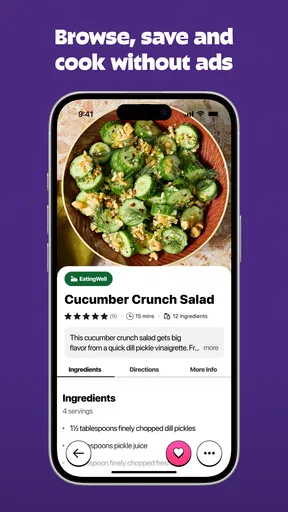
- Step-by-step instructions make recipes easy to follow.
- Meal-planning tools help organize what to cook.
Cons
- Recipe details and features may vary across entries.
- Some recipes require ingredients that are hard to find.
- Browsing a large collection can take time.
- An internet connection may be needed to load content.
- Advertising may interrupt the browsing experience.
FAQs for MyRecipes
What is MyRecipes, and what can I use it for?
MyRecipes is a recipe-focused app intended to help you discover dishes and keep cooking inspiration organized. Depending on the features available in your version, you may be able to browse recipes, review ingredient lists and preparation instructions, and save favorites for later. Check the app’s current description and screenshots before downloading, since available recipes and tools can vary by platform, region, and update.
Is MyRecipes free to download and use?
The cost and access model can differ by platform and may change over time. MyRecipes may be available to download without an upfront charge, but some content or features could require a subscription, in-app purchase, or account. Review the listing in the Apple App Store or Google Play before installing, and check its payment and subscription details so you understand any charges and renewal terms.
Can I save recipes or create a shopping list in MyRecipes?
Recipe-saving and shopping-list tools are useful for planning meals, but their availability depends on the version of MyRecipes you install. Look for options such as favorites, collections, meal planning, or shopping lists in the store listing and within the app. If these features matter to you, confirm that they are included on your device and whether they require signing in or paying.
Does MyRecipes work offline, and can I use it on Android and iOS?
Platform support and offline access depend on the app’s current release. The store pages indicate whether MyRecipes is offered for Android, iPhone, or iPad, while the app itself will show whether saved recipes remain accessible without an internet connection. Some browsing or account-based features may still require connectivity, so check the listing and test offline access before relying on it while cooking.
What permissions or personal information might MyRecipes require?
The information and permissions requested can vary with the app version and the features you choose to use. An account-based service may ask for details such as an email address, while optional features could request access to device functions. Review the privacy information on the relevant app-store page, grant only permissions that make sense for your use, and avoid sharing sensitive information unnecessarily.


